PULSE.

Free money app for Gen Z Bharat

Know what you can spend, without doing the math.

Your balance isn't what's free. PULSE keeps aside bills, SIPs and savings, and shows what you can safely spend until payday.

  • No bank login
  • No ads
  • No loan offers
  • Works on any phone

Your balance isn't what you can spend

Your bank says

₹8,420, but

You can actually spend

₹2,840

Your bills, the Goa trip fund and a small cushion were already spoken for. PULSE takes them out first.

How Safe to spend works

One number. Here's the maths.

Someone paid on the 4th, checking on the 27th.

Safe to spend, worked out

Available now (bank + cash)
₹8,420
Bills due before payday
−₹2,100
Plans you're saving for this cycle
−₹2,500
Safety buffer
−₹980
Safe to spend
₹2,840

That's about ₹405 a day for the 7 days until payday.

Try your own

Change any number. Nothing is saved or sent anywhere.

Safety bufferYou can change this in the app−₹980

Safe to spend

₹2,840

Per day

₹405

It runs payday to payday, and updates every time you log money in or out.

Read the full explanation

Spend without guessing

Ask first. Spend after.

Type an amount and see what it does to your week and your plans. Or just ask PULSE AI.

  • Log in 2 taps: "chai 20" just works
  • Speak or type, in Hinglish too
  • Answers from your own numbers
  • Your streak 🔥 keeps you coming back

Plans, Gullak, Bhisi

Goa trip, new laptop, emergency fund.

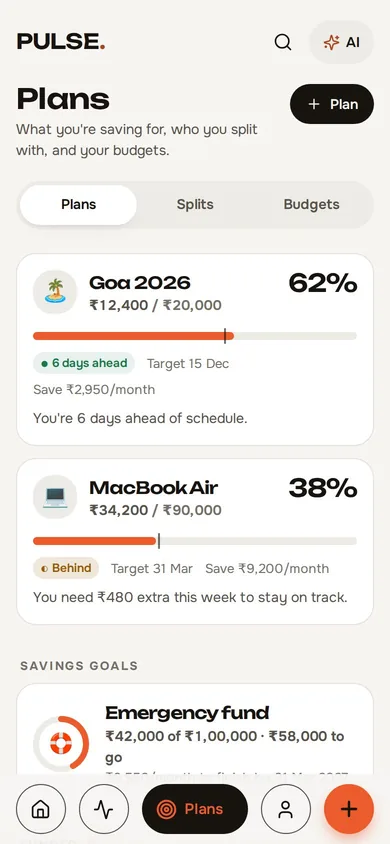
PULSE tells you if you're ahead or behind, and how much to keep aside each payday.

  • Gullak challenge: a coin a day, break it at the end
  • Bhisi with your group, with a real matka draw
  • Budgets that don't nag
  • Share your budget as a sticker card, showing only the number you choose
The Plans screen: Goa 2026 is 62% saved and 6 days ahead; MacBook Air is 38% saved.

Friends

Splits without the awkward texts.

Split equally, by amount, percentage or shares. Trips and flats get their own groups.

  • Friends on PULSE see shared splits on their phones
  • Your share counts toward your Safe to spend
  • Settle up in one tap

Everything else, already counted.

Add it once. PULSE keeps it in the number.

Investments
SIP, RD, FD, PPF, NPS, gold. Recorded on their date, kept aside before payday.
FD and RD maturity
See what you get back, and when.
Loans and EMIs
Your debt-free date, and how much of each EMI is interest.
Credit cards
Card spends count right away. That money's already spent.
Subscriptions and bills
What's due, and when.
Net worth
What you own minus what you owe, month by month.
Spending history
Where it went, and what each month carried over.
Monthly recap
Your month as a story.
Payday check-in
"Did your salary land?" One tap, or automatic.
Reminders
Bills, payday and streak, only if you want them.

Your money, your rules

We never ask for your bank login.

  • No bank login, card number, CVV or UPI PIN. Ever.
  • Never reads your SMS, contacts, photos or location.
  • No ads. No ad trackers. No loan offers. We don't sell your data.
  • You type what you spend, so PULSE only knows what you tell it.
  • Copy a backup or delete your account any time, from inside the app.

The honest bitWhen you sign in, your data is saved encrypted on our servers so it's on every phone you use. We hold the key, so we could open it. We only do that to run PULSE, fix a problem you report, or if the law asks.

No app store. Add it to your home screen.

Android and desktop

  1. Open PULSE in Chrome or Edge.
  2. Tap Install in the address bar or the menu.

iPhone and iPad

  1. Open PULSE in Safari.
  2. Tap Share.
  3. Choose Add to Home Screen.

Opens full screen. Works offline. Updates itself.

A note from the founder

"I kept checking my balance and still running out before payday. The number wasn't wrong. It just didn't know about rent, my SIP or the trip I was saving for.

So I built PULSE to show the one number that does. It's free, it doesn't want your bank login, and it will never show you a loan offer."

Krishna Raval Krishna RavalFounder, Mumbai

More about Krishna

Questions

Still not sure? How PULSE works has the full story.

What does Safe to spend mean?

The money that's actually free until your next payday, after bills, SIPs, what you're saving this cycle and a small safety buffer. You see it as a total and as a daily amount.

Is PULSE free?

Yes. No ads, no loan offers.

Do I need to connect my bank account?

No. PULSE never asks for bank logins, card numbers or UPI PINs. You type your balances and expenses yourself.

Where is my data stored?

In your browser on your own device. Once you sign in, it's also saved encrypted on PULSE's servers, so it's there on every device you use. It's not sold and there are no ads. Privacy Policy

Can PULSE track my SIPs, FDs and RDs?

Yes. Add each one with its amount and date. PULSE records it every month and keeps it aside before payday.

Can I split bills with friends?

Yes. Split equally, by exact amounts, percentages or shares, with groups and settle-ups.

Does it work on iPhone?

Yes. Open PULSE in Safari, tap Share, then Add to Home Screen. It works offline too.

What if my salary comes on a different date?

Safe to spend runs from your payday to your next payday, whatever date that is.

See your number in about a minute.

No bank login. No ads. Delete any time.